PURPOSE OF MEDIA SOCIAL NETWORKING SERVICE SYSTEM
This
system will allow users to share photos and videos with other users.
Additionally, users can follow other users based on follow request and
they can see other user’s photos and videos. In this system, you can
search users and see their profile if their account is public. Otherwise
you need to send a follow request.
Before starting to design any
system like photo and video sharing social networking service system, it
is recommended to think system boundaries and requirements in detail
and try to understand what will be the system capacities in the future
(like 5 or 10 years) This is very critical since at some point if the
system’s user count goes exponentially, the system’s capacity will not
enough to give fast response. Behind architectural design, you have to
think about some pillars. These are;
– Availability
– Reliability
– Resiliency
– Durability
– Cost Performance
These
are the pillars that we should consider together since they are coupled
to each other. In brief, availability means that system should be
always available. Reliability means that system should work as expected.
Resiliency means that how and when system will recover itself if there
is any problem. Durability is the one pillar that each part of system
should exists until we delete. Cost performance is also important topic
that will basically related to use services under cost efficiency. It
can be illustrated like if the system will be built on AWS and it is
enough to use t2 micro EC2 instances, there will be no any reason to use
larger EC2 instances and pay extra money.
REQUIREMENTS AND SYSTEM BOUNDARIES
If
you want to design a system, you must first define the requirements and
system boundaries. Probably you will have a service design documents
and you will define requirements, boundaries, architectural decisions
and others in this service design documents. But basically, photo and
video sharing social networking system will be a service that user can
share images and videos with other users. Users can have a public or
private account which means if you have a public account, your
images/videos will be visible to other users (no matter you have a
relation or not). But if you have a private account then your
images/videos will be visible only for your friends. So your system will
support these features;
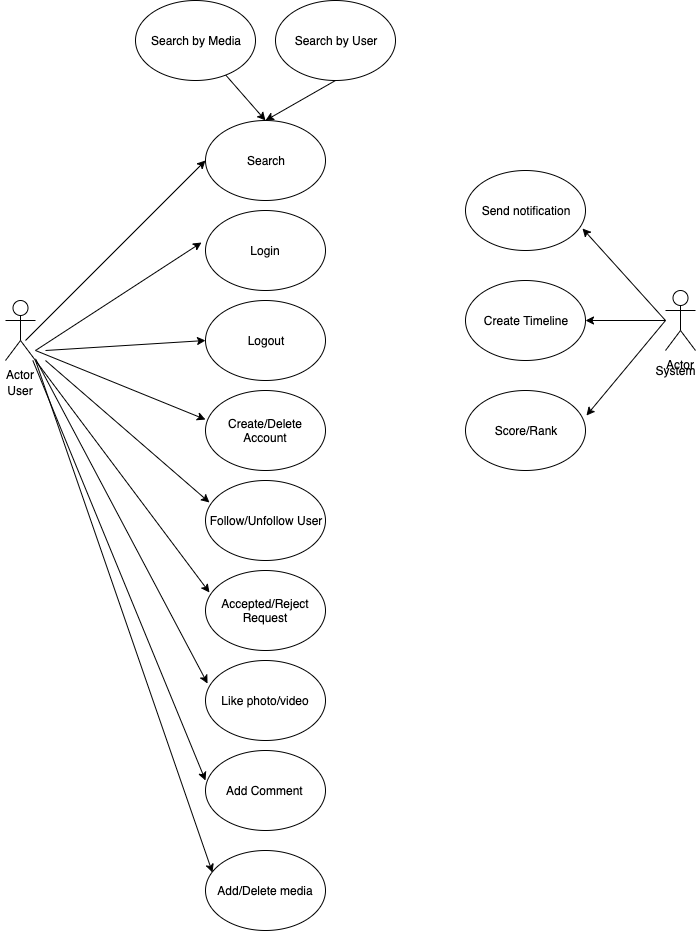
– Users must be able to create an account.
– Each registered users must have their own personal account page.
– Users must be able to login the system and logout from the system.
– Users must be able to see other users’ photos and videos in their timeline.
– Users must be able to upload photos and videos if they login.
– Users must be able to delete their photos and videos if they login.
– Users must be able to search users.
– System must be able to support public and private account.
– Users must be able to send a follow request to other users.
– Users must be able to accept or deny follow requests.
– Users must be able delete their account when they want.
– Users must be able like other users photos and videos.
– System should be highly available
– System should be highly reliable
– System should be durable
– System should be resilient
– System should be highly cost and performance efficient
When
system boundaries and functional requirements are defined, it is needed
to think about cloud or on-promise options. Your system can be;
– %100 on-promise (Your own data center/server)
– %100 cloud (AWS, Google Cloud, Azure)
– Mix of on-promise and cloud (You can have both during the migration process)
Today, cloud services have a huge popularity thanks to cloud mechanism advantages. These advantages;
– Cost efficiency
– High speed
– Security
– Back-up solutions
– Unlimited storage capacity
– A lot of different service options. You do not need to create world from scratch
– Reliability
– Durability
– Resiliency
– Monitoring for almost all services
– Easy software integration with other services
– Maintenance from cloud providers and more…
Let’s think about design boundaries;
– Service will be both write-heavy and read-heavy.
– Service will be stay consistent and reliable which means there should
not be any data loss. – Service will be durable which means all
piece of system should exists until they are delete manually.
Before
defining capacity consideration, you have to define what is the purpose
of the service. Even if it is more essential for on-promise services, it
is essential for both on-promise and cloud services since you can
select right services based on purpose, locate them based on available
regions and define capacities. Such examples are;
– Create more read services than write services.
– Select the server type according to the type of operation.
– Define caching strategies based on your capacity estimation.
– Select database type (SQL, NoSQL) based on your requirements.
– Define back-up solutions based on your capacity estimations.
– Define data sharding strategies based on your requirements and etc…
Let’s
assume you have 100M total users. In your system, we will assume that
downloading data is heavier than uploading data and let’s assume the
ratio of reading and writing is 10:3.
We will assume that average size of photo is 200 KB and average size of video is 25 MB so the system will have;
Photos capacity in 5 years;
– 5 * 100M * 10 * 200KB = 1 PB. (Assuming each user will upload 10 photos each year).
– 12PB for replication and back-up.
So that total capacity of photos will reach to 3 PB in 5 years.
Videos capacity in 5 years;
– 5 * 100M * 1 * 25 MB = 12 PB. (Assuming each user will upload 1 videos each year).
– 36 PB for replication and back-up.
This
calculation is just a brief example of how to define system capacity
and we will not calculate daily download/upload capacity and metadata
capacities but you should consider this calculation (and daily
read/write capacity estimation) for service/database scaling.
API DESIGN
We
can use REST or SOAP to serve our APIs. Basically, there will be three
important API’s of photo and video sharing service system.
1- PostMedia (api_dev_key, media_type, media_data, title, description, tags[], media_details)
PostMedia
will responsible for uploading photo or image. api_dev_key is the API
developer key of a registered account. We can eliminate hacker attacks
with api_dev_key. This API returns HTTP response. (202 accepted if
success)
2- GetMedia (api_dev_key, media_type, search_query, user_location, page, maximum_video_count = 20)
Return JSON containing information about the list of photos and videos.
Each media resource will have a title, creation date, like count, total
view count, owner and other meta informations.
3- DeleteMedia (api_dev_key, ID, type)
Check if user has permission to delete media. It will return HTTP
response 200 (OK), 202 (Accepted) if the action has been queued, or 204
(No Content) based on your response.
**There are more APIs to design
photo and video sharing service, however, these three APIs are more
important than the others. Other APIs will be like likeMedia, search,
recommendation or etc…
DATABASE SCHEMA
You can
think about database part into two parts. The first part will be
related to how to keep images/videos in secure way and second part will
be related to how to keep images/videos metadata and user
informations/user relations data in database. Videos and images are
static data so that you can keep images/videos in image storage. You can
use 3rd party services like Chromecast or if you are using AWS, you can
store real media files on S3. S3 will offer different types of storage
based on your strategy. To illustrate this, S3 will offer S3 standard,
s3 Infrequently access, S3 Glacier and etc… If we think for Instagram we
can start to use S3 standard to keep images/videos if they upload in
this year and after first year we can move them to S3 infrequently
access and after 10 year we can move them to S3 Glacier. This makes
system cost efficient since even though S3 standard is one of the
cheapest service in AWS, S3 Infrequently access is cheaper than S3
Standard. Also We S3 Standard and S3 Infrequently access automatically
keeps data in different availability zones (like data center) so that
you do not worry about reliability. But it will be nice to keep mirror
data (replication) in different region to increase data redundancy.
Moreover, it will be nice to use Cloudfront as a distributing caching
layer to decrease read/access time. Cloudfront is a distributed AWS
caching service that is located different edge locations. You can use
cloudfront both read and write options.
For User, you can use both
RDBMS or NoSQL. We can use graph database so there will be strong
relationship between Users. AWS Neptune or Neo4j can be suitable
databases for this purpose. Design on MySQL or PostgreSQL;
User:
USERID: INT
NICKNAME: NVARCHAR(50)
PASSWORD: VARCHAR(255) with Hash function
EMAIL: NVARCHAR(50)
BIRTHDATE: DATETIME
REGISTERDATE: DATETIME
LASTLOGINDATE: DATETIME
Primary Key: USERID
UserRelations
ID: INT
FOLLOWERID: INT
FOLLOWINGID: INT
Primary Key: ID
Foreign Key: FOLLOWERID, FOLLOWINGID with User Table
For post metadata you can use RDBMS like MySQL or PostgreSQL.
Post
ID: INT
USERID: INT
MEDIA_TYPE_ID: INT
PATH: NVARCHAR(100)
DESCRIPTION: TEXT
VISIBILITY: BOOLEAN
ADDEDDATE: DATETIME
VIEWS_COUNT: INT
Primary Key: ID
Foreign Key: USERID with User Table
Foreign Key: MEDIA_TYPE_ID with Media_Type Table
Primary Key: (ID, TYPE)
Foreign Key: MEDIAID with Media Table
UserLike
ID: INT
MEDIAID: INT
USERID: INT
Primary Key: ID
Foreign Key: USERID with User Table
Foreign Key: MEDIAID with Media Table
Comment
ID: INT
MEDIAID: INT
USERID: INT
COMMENT: NVARCHAR(256)
Primary Key: ID
Foreign Key: USERID with User Table
Foreign Key: MEDIAID with Media Table
Of
course we will have more database table and these are just sample. It
will be nice to follow normalization rules for database designing
process.
** We will store photos/videos in AWS S3. Also we can use S3 Lifecycle rules for cost efficiency.
** We can use Cassandra, column-based data storage, to save follow-up of users.
Note: A lot of NoSQL database supports replication.
Note: We can create an secondary index on Media Table – ADDEDDATE Field because we need to get latest media files.
SYSTEM DESIGN CONSIDERATION
– System will have caching mechanism to fast response when download media files.
– System will be eventually consistent but we will have cache eviction policies to clean cache.
– System will have push notification mechanism to send information to users (Like if users like photo/video).
– System will have Cloudfront as CDN. Cloudfront is located EDGE
locations so that response time will be fast. We can use Cloudfront both
for download and upload.
– System will use NGinx as a load
balancer and we will implement intelligent routing algorithm to send
requests only healthy services.
– System will have pre-generated service to create timeline for users.
– System will keep data and files more than one. (Replication, back-up)
– System will have monitoring mechanism. System will send alert if system components fails based on alert consideration
– System will support code pipeline mechanism. We can use AWS Codecommit, Codebuild, CodeDeploy and CodePipeline.
HIGH-LEVEL SYSTEM DESIGN
If we are designing a system, the basic concepts we need are;
– Client
– Services
– Web server
– Application server
– Media file Storage
– Database
– Caching
– Replication
– Redundancy
– Load balancing
– Sharding
There
are two separate services in this system, which are upload/download
media. Media storage is used to keep static media contents. A database
is used to save all metadata about users and media contents. When a
request comes to the system, it will come to web servers first. Web
servers redirect an incoming request to application servers.
Replication
and back-up are two important concepts to provide pillars we mentioned
before. Replication is a very important concept to handle a failure of
services or servers. Replication can be applied database servers, web
servers, application servers, media storages and etc.. Actually we can
replicate all parts of the system. (Some of AWS services like Route53,
they are highly available in itself so you do not need to take care of
replication of Route53, Load balancer, etc..) Notice that replication
also helps system to decrease response time. You imagine, if we divide
incoming requests into more resources rather than one resource, the
system can easily meet all incoming requests. Additionally, the optimum
number of a replica to each resource is 3 or more. You can provide
redundancy by keeping data in different Availability zone or different
region in AWS.
For caching strategies, we can use global caching
mechanism by using cache servers. We can use Redis or memcache but the
most important part of caching strategy is how to provide cache
eviction. If we use global cache servers, we will guarantee that each
user will see the same data in the cache but there will time latency if
we use global cache servers. As a caching strategies, we can use LRU
(Least Recently Used) algorithm.
For media files caching, as we
mentioned before, we will use CDN. CDN is located on different edge
locations so that the response time will be smaller than fetching media
contents directly from AWS S3.
Sharding IDs in this kind of services is always hard since there will be huge data but you can check;
a href=”https://instagram-engineering.com/sharding-ids-at-instagram-1cf5a71e5a5c/”>
Load
balancer allows incoming requests to be redirected to resources
according to certain criteria. We can use load balancer at every layer
of the system. If we want to use AWS Load balancer service, AWS will
support three different Load Balancer types which are;
– Network Load Balancer
– Classical Load Balancer (Deprecated)
– Application Load Balancer
For
this service, application load balancer will be fit to our service and
it will also handle AZ distribution in itself. Otherwise you can use
NGinx but you have to implement algorithm and you have to provide
maintenance if we want to use NGinx.
We can use load balancer;
– Between requests and web servers.
– Between web servers and application servers.
– Between application servers and databases
– Between application servers and image storages.
– Between application servers and cache databases.
– We can use Round Robin method for the load balancer. Round Robin
method prevents requests from going to dead servers but Round Robin
method doesn’t deal with the situation that any server is under
heavy-traffic. We can modify Round Robin method to be a more intelligent
method to handle this problem.
BASIC CODING SAMPLE
// Java Program to explain the designpublic enum InvitationStatus{ PENDING, ACCEPTED, REJECTED, CANCELLED}public enum AccountStatus{ PUBLIC, PRIVATE, CLOSED}public enum MediaStatus { PUBLIC, PRIVATE}public enum MediaType { PHOTO, VIDEO}public class AddressDetails { private String streetAddress; private String city; private String country; ...}public class AccountDetails { private Date createdTime; private AccountStatus status; private boolean updateAccountStatus(AccountStatus accountStatus); ...}public class Invitation { private Integer userID; private InvitationStatus status; private Date sentDate; public boolean updateInvitation(InvitationStatus status); ...}public class PendingInvitation extends Invitation{ public boolean acceptConnection(); public boolean rejectConnection(); ...}public class UserRelations { private HashSet<Integer> userFollower; private HashSet<Integer> userFollowing; private HashSet<ConnectionInvitation> connectionInvitations; ...}public class Comment { private Integer id; private User addedBy; private Date addedDate; private String comment; public boolean updateComment(String comment); ...}public class Media { private Integer id; private User createdBy; private MediaType mediaType; private String path; private MediaStatus mediaStatus; private int viewsCount; private HashSet<Integer> userLikes; private HashSet<Integer> userComments; ...}public class User { private int id; private String password; private String nickname; private String email; private AddressDetails addressDetails; private AccountDetails accountDetails; private UserRelations userRelations; private HashSet<ConnectionInvitation> invitationsByMe; private HashSet<ConnectionInvitation> invitationsToMe; public boolean updatePassword(); public boolean createMedia(Media media); public boolean updateMedia(int mediaId, MediaStatus mediaStatus); public boolean sendInvitation(ConnectionInvitation invitation); public List<User> searchUser(string term); public List<Media> searchMedia(string term); ...}
No comments:
Post a Comment